Self-serve business phones

Your office phone system, in a browser tab.

Sign up online, pick a number and make your first call in minutes. NovaLink Voice gives small and medium offices a real front desk, real desk phones and a drag-and-drop call flow, with no technician visit or sales call needed.

  • Agents from $9.99/user/mo
  • Call-Flow Builder free
  • Works in Chrome or Edge
app.pbx.novalinkvoice.com/reception
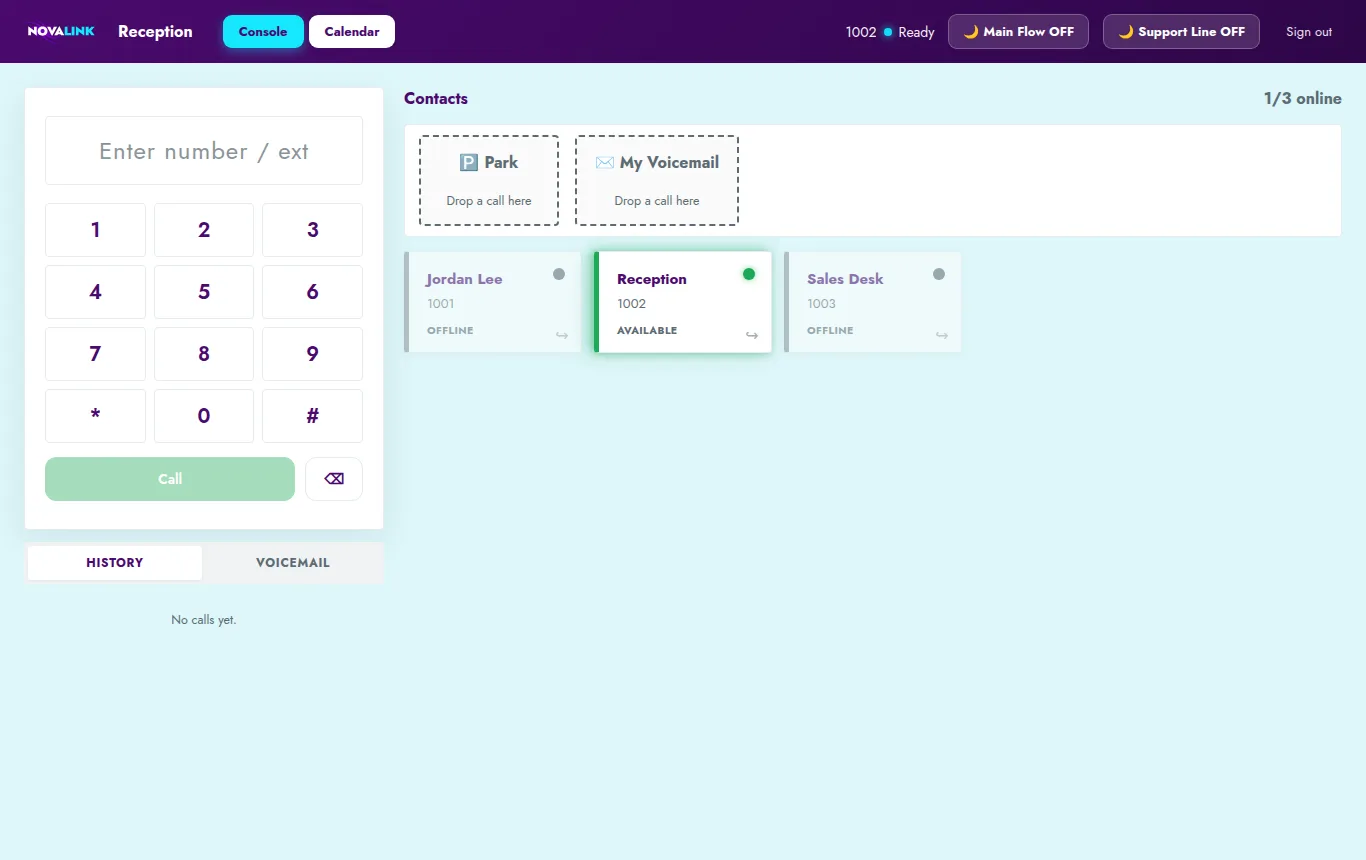
The Reception console: a dial pad, Park and Voicemail drop targets, and a tile for each extension with live status
No software to installEvery app runs in your browser
Desk phones set themselves upPlug in, and it rings
Keep your numberPort it from your old carrier
911 alerts built inThe front desk knows instantly

How it works

Signed up to calling in four steps

  1. 1

    Sign up

    Create your account online and add a credit card or bank account for automatic payment.

  2. 2

    Pick a number

    Choose a new number or port the one you already have. Add your 911 address.

  3. 3

    Build your call flow

    Drag in your hours, holidays, menu and who rings. Publish, and it's live.

  4. 4

    Start calling

    Invite your team. They sign in from a browser, a desk phone or their cell.

Four apps, one sign-in

Everything your office needs to answer the phone

One email and password signs you in to all of them.

Receptionist

A front desk console that sees everyone

Every extension appears as a tile with live status: available, ringing, on a call or offline. Transfer with one click, or drag the call where it needs to go.

  • Drag-and-drop transfers: direct, attended (talk first) or conference
  • Park a call for anyone to pick up
  • Drop a caller into voicemail for anyone
  • Night Ring: send a line to after-hours with one button
  • Groups: a church and its school, or two offices, each get their own section
  • Forward a colleague's calls to their cell while they're out
Reception
Reception console with extension tiles, Park and Voicemail drop targets and Night Ring buttons
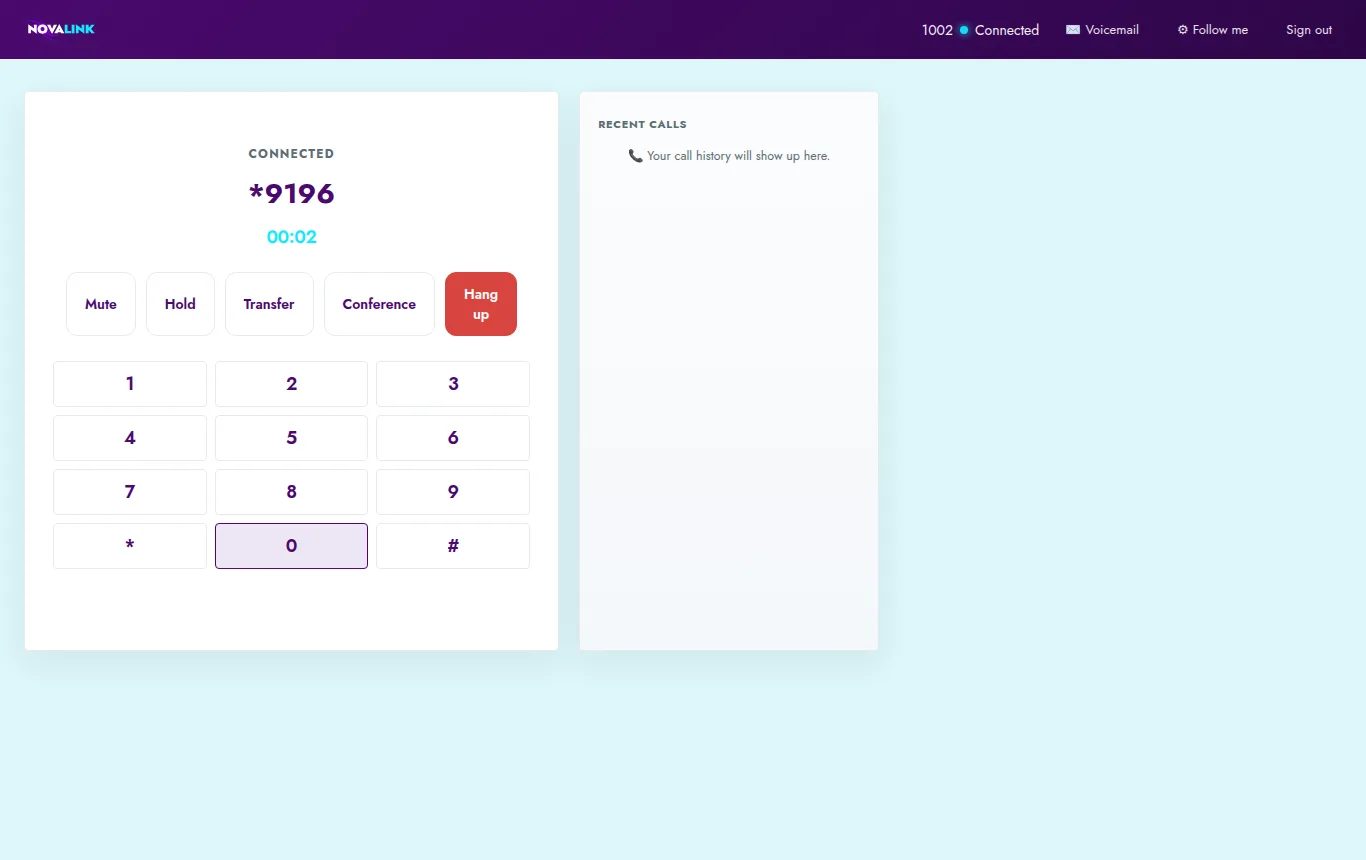
Agent

Your desk phone, in a browser tab

Sign in and your extension rings on screen. Use a headset for the best sound, and keep working in your other tabs while it's open.

  • Dial pad, recent calls and one-click callback
  • Mute, hold, transfer, conference and keypad tones
  • Pick up parked calls from anywhere in the office
  • Listen to and delete voicemail, with voicemail to email
  • Follow me: ring your cell at the same time, and whichever answers first takes the call
Agent
Agent app during a call, showing mute, hold, transfer, conference and keypad buttons
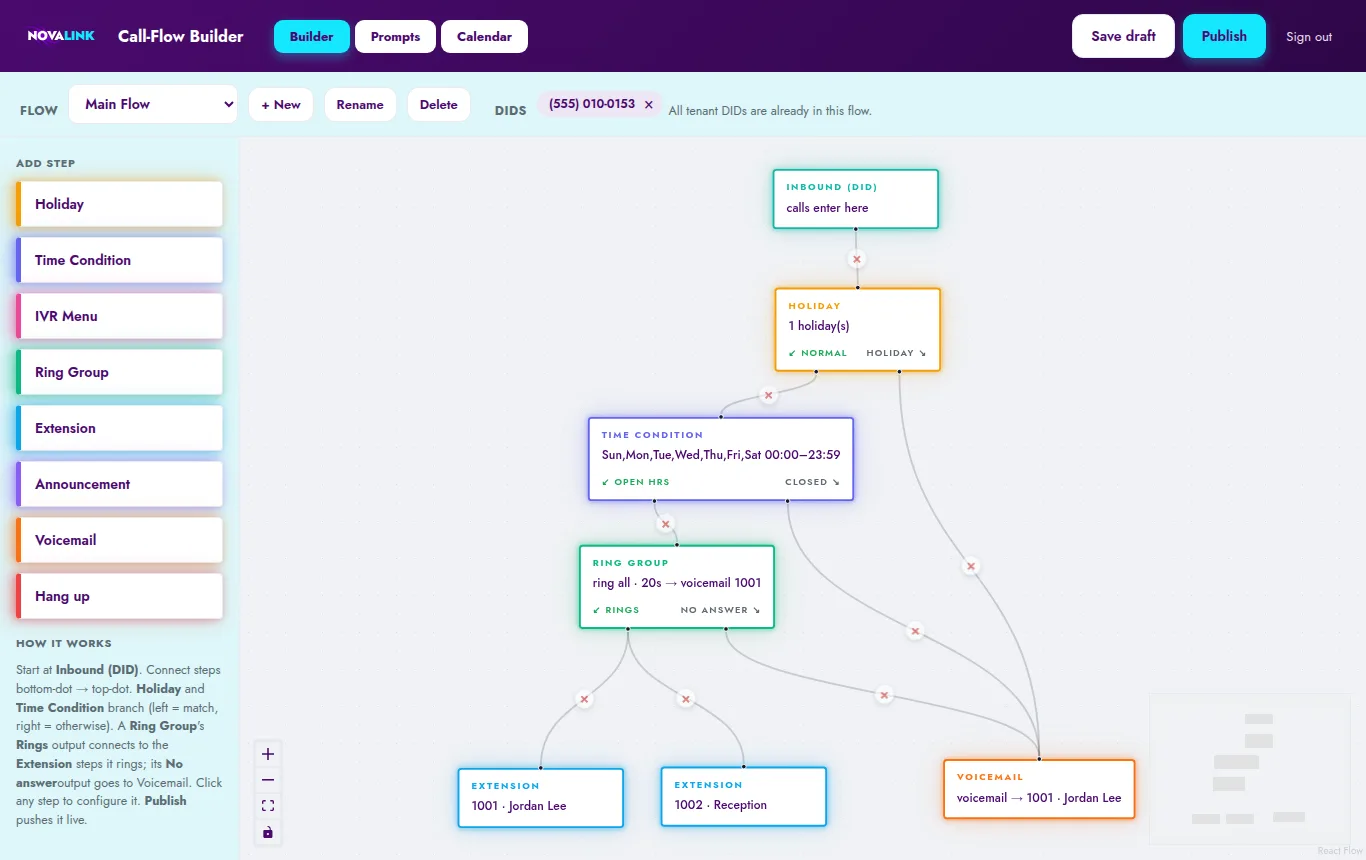
Call-Flow Builder · Free

Decide what happens when someone calls

Drag steps onto a canvas and connect them: your hours, your holidays, your "press 1 for…" menu, who rings and where unanswered calls go. Save a draft, then publish when it's right.

  • Time conditions, IVR menus, ring groups, announcements and voicemail
  • Holidays worked out for you every year, including Thanksgiving and Good Friday
  • Upload your own greetings and recordings
  • A calendar view shows every open and closed day at a glance
  • One flow per line or department
Call-Flow Builder
Call-Flow Builder canvas: Inbound, Holiday, Time Condition, Ring Group, Extension and Voicemail steps connected by lines
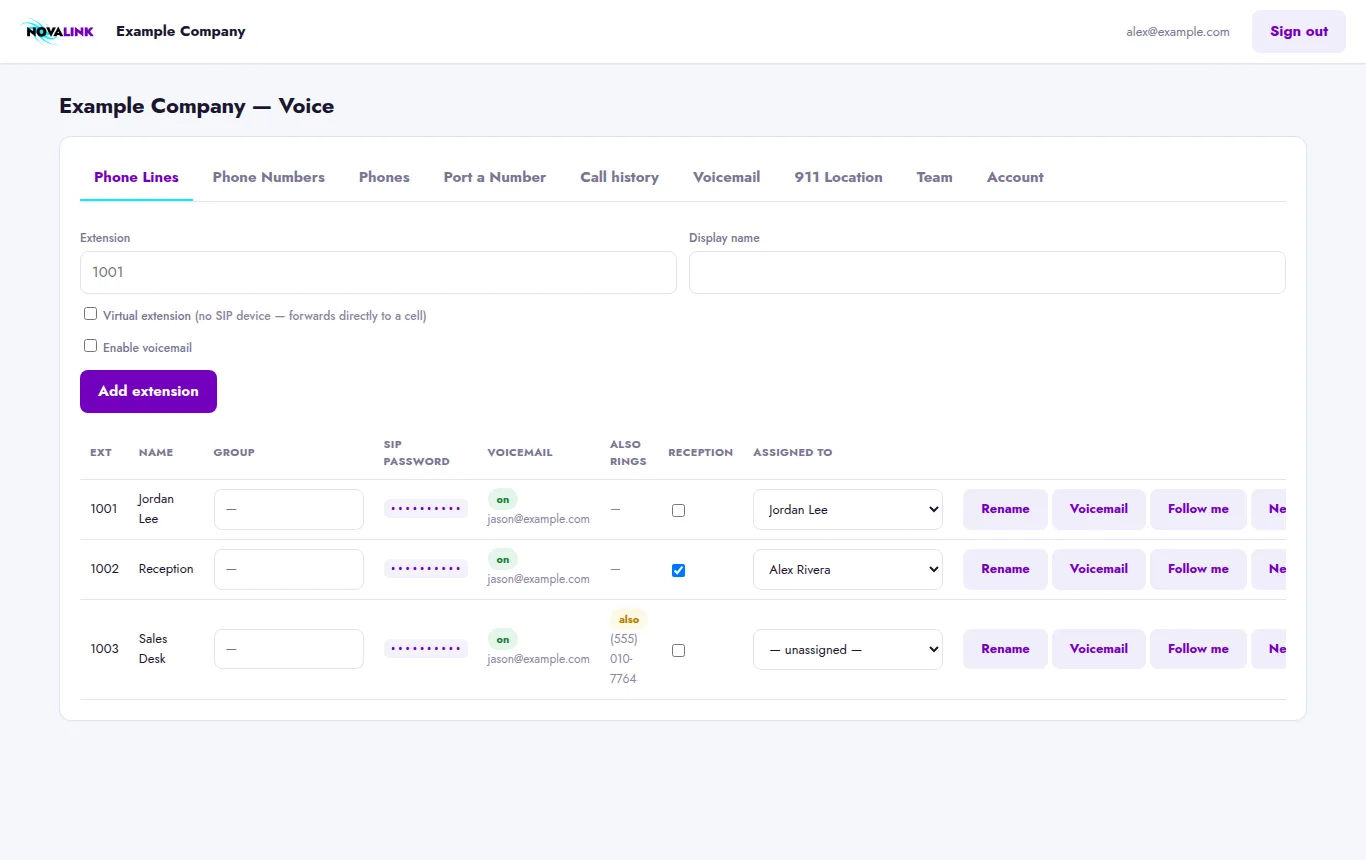
Admin

Run the whole system yourself

The Voice Portal is where you add lines, numbers, phones and people. Every change shows up on your bill right away, so there's never a surprise.

  • Add extensions, including virtual lines that forward to a cell
  • Pick numbers, set caller ID and port numbers in
  • Call history with CSV export
  • Invite your team as admins or members
  • Two-factor sign-in
  • See your bill, invoices and card, all without calling anyone
voice.novalinkvoice.com
Voice Portal Phone Lines tab listing extensions with group, reception and assignment columns

Phones and hardware

Use a browser, a desk phone, your cell or all three

Desk phones that set themselves up

NovaLink supplies the phone. Claim it in the portal, pick its extension and plug it in. It sets itself up.

Fax, door buzzer, elevator

Adapters connect your analog devices, like fax machines, elevator phones, door buzzers and postage meters. Each port gets its own extension.

Mobile app by QR code

Scan a one-time QR code to set up the Linphone app on your phone as your extension.

Ring your cell too

Follow me rings your desk and your cell together. Virtual lines skip the desk phone entirely.

Safety, built in

If someone dials 911, the front desk knows instantly

Every Reception console shows a flashing red alarm naming the extension, the person and the time, so someone can check on them and meet responders at the door. Your alert list gets an email at the same moment.

  • Dial 933 any time for a safe test that reads back your 911 address. No emergency call is placed.
  • Each number has a registered 911 address you can update when you move
  • 911 always works, even if a payment is late

Pricing

Simple, per-user pricing

Pay only for the people who use it. Add or remove users any time, and your bill adjusts to the day.

Agent

For everyone who makes and takes calls

$9.99/user/mo

  • Agent app in your browser
  • Desk phone, mobile app or cell
  • Voicemail to email
  • Follow me to your cell
  • Transfer, park, hold and conference
Get started

Call-Flow Builder

For admins who set up the phone system

Free

  • Included with any agent
  • Hours, holidays and menus
  • Ring groups and announcements
  • Your own greetings
  • Calendar view
Get started
6 simultaneous outside calls on every account, expandable up to 30.
Phone numbers are billed per number.
Taxes and fees: Federal USF, your local 911 fee and sales tax are itemized on your bill.
Tax-exempt? Churches, schools and non-profits can upload an exemption certificate. Sales tax stops right away.
Pay your way: we accept credit cards, ACH bank transfer, Apple Pay, Google Pay and Cash App Pay.

Is it right for you?

Built for offices, not call centers

A great fit for

  • Small and medium offices
  • Churches, schools and non-profits
  • Front desks that route calls to staff
  • Home phones and home offices

Not built for

  • Call queues. Callers aren't held in line for the next agent.
  • Call recording. Only voicemail is recorded, and it can be emailed to you.
  • Call center dashboards, wallboards or agent stats

Keeping it simple is what keeps it affordable and easy to run yourself.

FAQ

Questions, answered

Do I need to install anything?

No. The Agent, Reception and Builder apps all run in Chrome or Edge on a computer. A headset gives the best sound. If you'd rather have a desk phone or use your cell, you can do that too.

Can I keep my current phone number?

Yes. Request a port from the Voice Portal and we'll move the number you own from your old carrier. You can also pick a new number in the meantime.

What's the difference between an Agent and a Receptionist?

Agents make and take calls. A Receptionist gets everything an Agent does, plus the Reception console: everyone's status at a glance, drag-and-drop transfers, call parking and Night Ring. You pay the Receptionist price instead of the Agent price for that user, not both.

How many calls can we have at once?

Every account can have 6 outside calls going at the same time, and that can be raised up to 30. Calls between extensions inside your office don't count toward that limit.

Can calls ring my cell phone?

Yes. Follow me rings your extension and your cell at the same time, and whichever answers first gets the call. It works with US and Canadian numbers. You can also set up a virtual line that rings only your cell.

Do you have call recording or call queues?

No. NovaLink Voice is built for offices, not call centers. Voicemail is recorded and can be emailed to you, but live calls aren't recorded, and there are no hold queues.

How does 911 work?

911 calls go to the registered address on file for your number, so keep it current if a phone moves. When anyone dials 911, every Reception console shows an alarm and your alert list gets an email. Dial 933 for a safe test.

How do I pay, and can I change my plan?

Add a credit card or bank account (ACH) on the Billing tab of your Voice Portal, and you're on automatic payment. We also accept Apple Pay, Google Pay and Cash App Pay. Add or remove users and numbers whenever you like: you only pay for the days you have them, and your bill updates right away.

We're a church or non-profit. Can we skip sales tax?

Yes. Upload your exemption certificate on the Billing tab and sales tax stops right away while we review it. The 911 fee and Federal USF still apply.

How do I cancel?

Remove the lines and numbers you don't need in the Voice Portal and billing adjusts automatically. To close the account entirely, contact us.
Ready to answer the phone?

Sign up online and make your first call today.